Signatures that hold up.
Send any PDF for e-signature in minutes. Every signer is verified, every field is placed for you, and the final PDF is sealed with a tamper-evident audit trail, so you can prove who signed what, and when.
Free plan · No card required · Signers never need an account
A signature image proves almost nothing. What holds up is the evidence around it: who signed, how they proved it, what exactly they saw, and when, sealed so nobody can quietly change a word.
Built for people who don’t do paperwork for a living
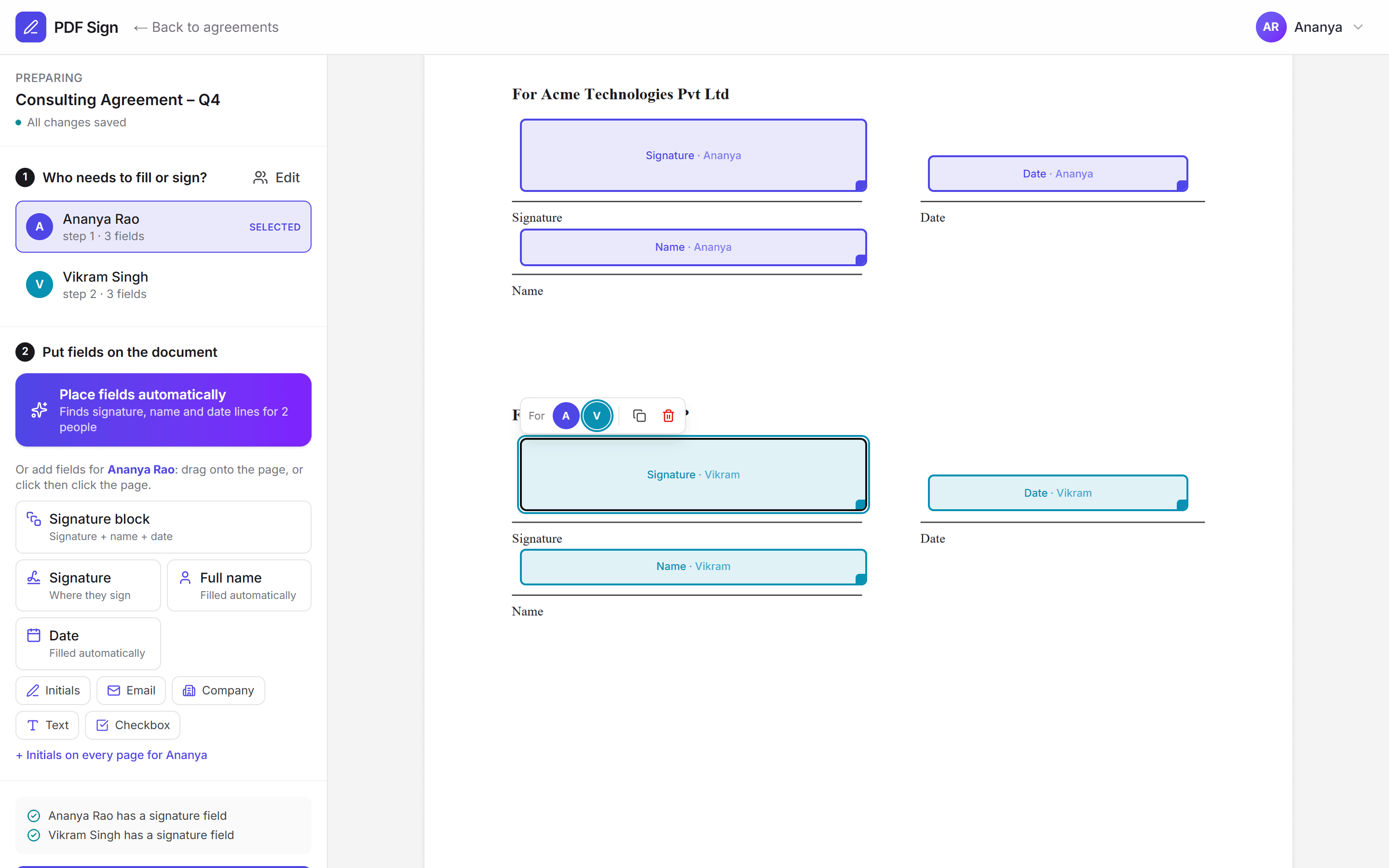
Upload. Check. Send. Fields place themselves.
PDF Sign reads your document, finds the lines marked Signature, Name, Date and Designation, and gives each person their own coloured block. Drag anything that needs a nudge, click a field to change who fills it, and you’re done.
- Works with three, four or more parties
- One-click signature blocks and initials on every page
- Clear checklist: who still needs a signature field
Ananya (you)
Rohan (client)
Meera (partner)
How it works
From PDF to sealed agreement in four steps
No training needed for you or your signers. Every step produces evidence automatically.
Everything you need
Simple for signers. Thorough where it counts.
Fields place themselves
We read your PDF, find the signature, name and date lines, and set up each signer. You just check and send.
Try it on your PDFProject contracts clients complete
Enter your estimate; the client fills in their GSTIN and address while signing.
Email & SMS codes
Every signer proves who they are before the document opens.
16 drafted agreements
NDA, MoU, MSA, work order, employment and more.
Teams & roles
Owners, admins, managers, senders and viewers.
Bulk send
One template to hundreds of people from a CSV.
Automatic reminders
Nudges on your schedule, plus expiry warnings.
Hindi & Unicode
Devanagari renders correctly in sealed PDFs.
Your brand
Logo, colour and sender name on every email.
Reports & exports
Turnaround, completion rate and CSV exports.
API & webhooks
REST API with idempotency and signed events.
Evidence package
Sealed PDF, certificate, audit trail and timestamps in one ZIP.
Agreement templates
Start from a contract drafted for India
Answer a few questions, preview the PDF, send. Every signature and initials field is already in place.
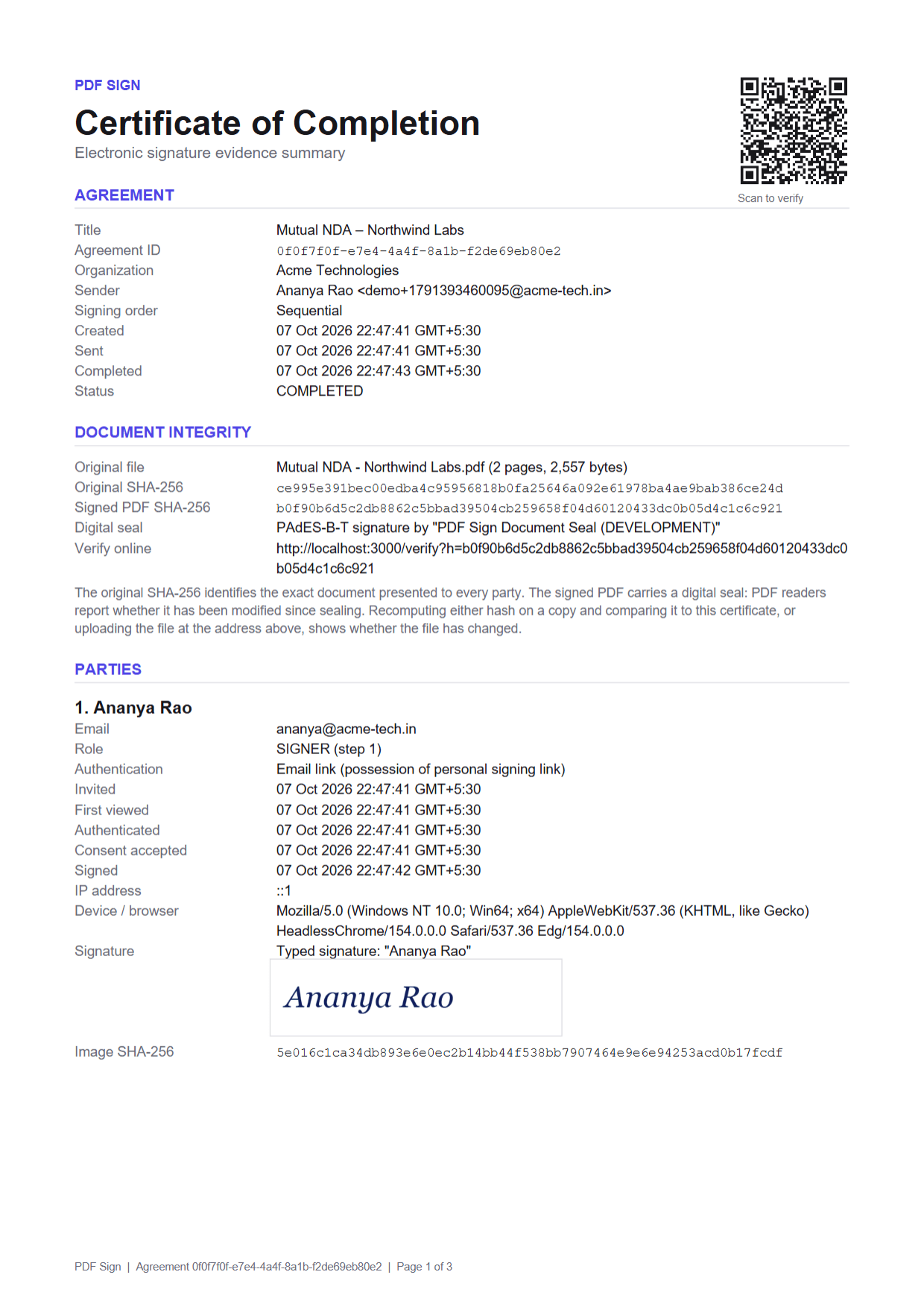
Evidence, not just ink
When an agreement is challenged, the evidence package does the talking
Each agreement records identity, intent, integrity and time, and seals them together.
- Identity
- Who signed, and how they proved it: email or SMS code, IP address and device.
- Intent
- Consent to sign electronically and an explicit confirmation before finishing.
- Integrity
- SHA-256 of the original and the sealed PDF, protected by a digital seal.
- Time
- Timestamps from a trusted authority, not just our server clock.
For your signers
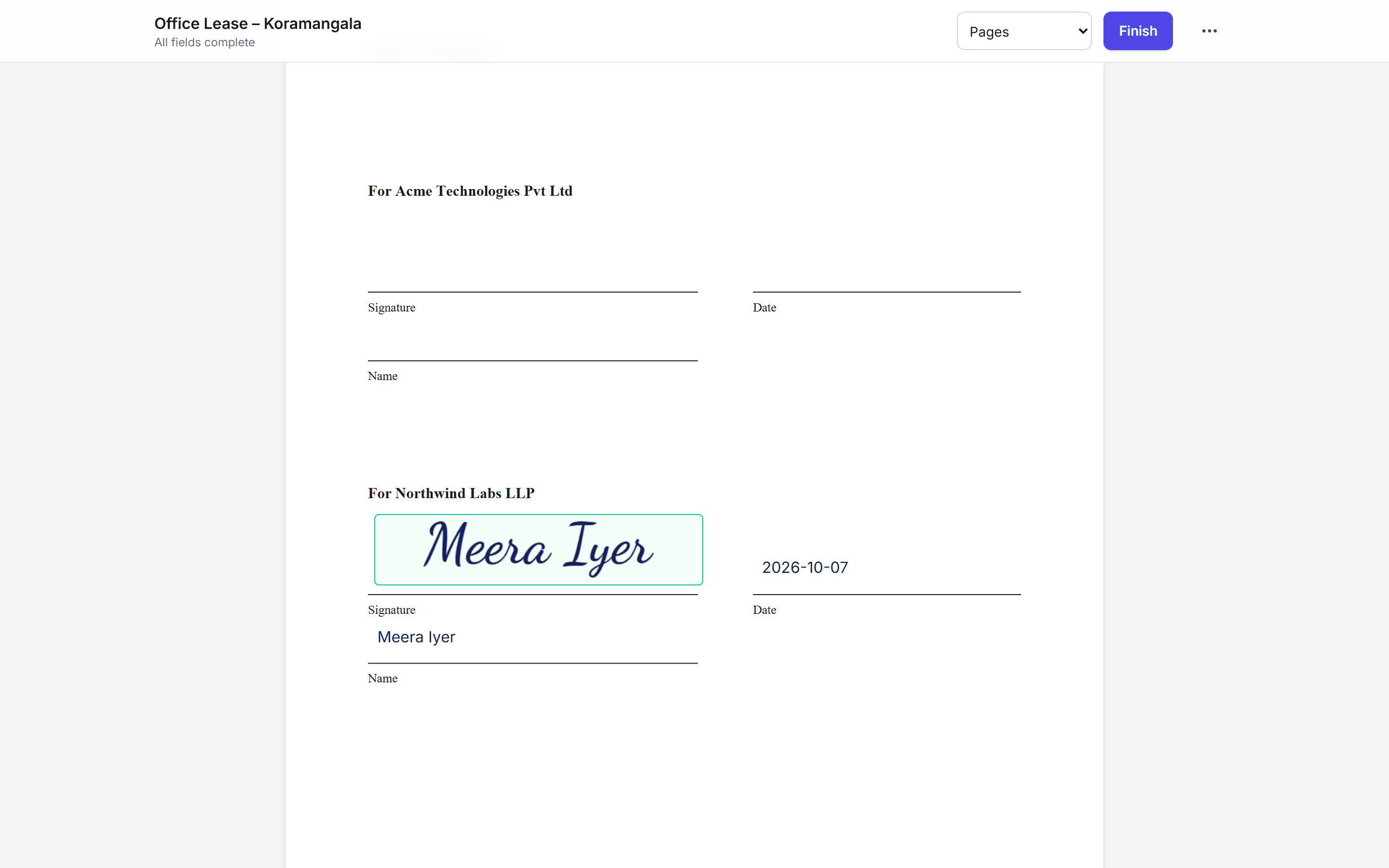
Sign in under a minute, from any phone
No app, no account, no password. A personal link, a one-time code, a clear view of exactly what they're signing, and a copy in their inbox when everyone is done.
- Guided “next field” navigation
- Clients fill in their own details while signing
- Download a copy to review before signing
- Decline with a reason, anytime
For your team
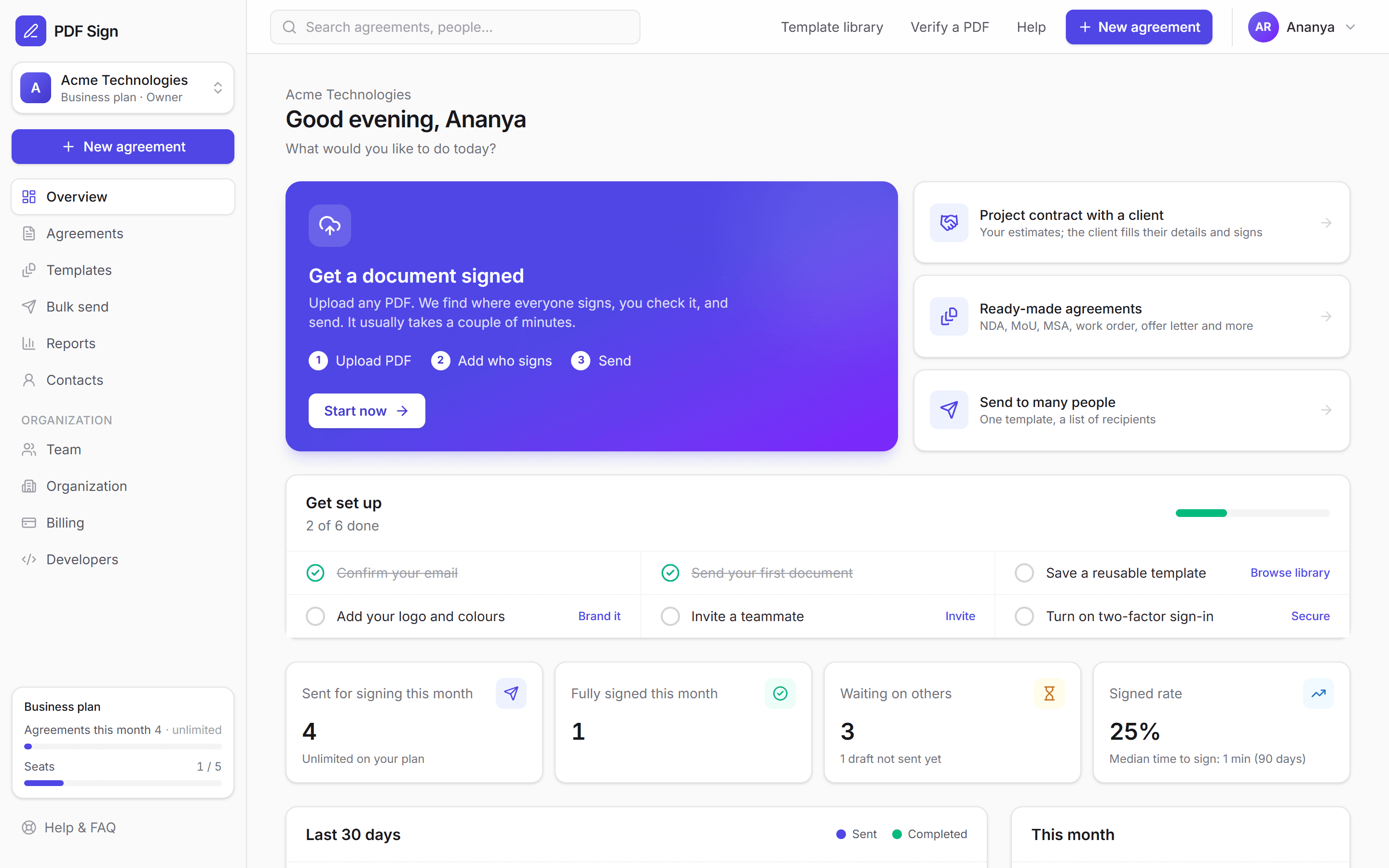
One workspace for everyone who sends
Invite colleagues with the right role, see what needs attention at a glance, and pay in rupees with a GST invoice for every charge.
- Owner, Admin, Manager, Sender and Viewer roles
- Documents waiting for your signature, on your dashboard
- Several organizations under one login
- UPI, cards and net banking through Razorpay
Security
Built like the evidence depends on it, because it does
Your documents are sensitive. Security is part of the product, not a page on the website. Read the details →
SHA-256 fingerprints
Original and final documents are hashed; any change is detectable.
PAdES digital seal
Final PDFs carry a cryptographic seal PDF readers can verify.
RFC 3161 timestamps
A trusted authority attests when the seal and audit trail existed.
Append-only audit trail
Hash-chained events; the database rejects edits and deletes.
Argon2id & two-factor
Modern password hashing and authenticator-app 2FA for your team.
Private by default
Private storage, short-lived signed links, encryption in transit and at rest.
Tenant isolation
Every record is scoped to your organization and checked on every request.
Public verification
Anyone can check a PDF against our records without uploading it.
Pricing
Simple plans in rupees
Start free. Upgrade when you send more. Prices exclude GST.
Free
Try it on real documents
₹0
Start free- 3 agreements a month
- Email verification and OTP
- Draw, type or upload signatures
- Sealed PDF + certificate
Starter
For freelancers and small teams
₹399/user/mo
Billed yearly · ₹4,788/user
Choose Starter- 30 agreements a month per user
- Unlimited templates
- Automatic reminders
- Team members & roles
- Reports
Professional
For growing businesses
₹799/user/mo
Billed yearly · ₹9,588/user
Choose Professional- Unlimited agreements
- SMS OTP verification (50/month per user)
- Custom branding
- Sequential & parallel signing
- Priority email support
Business
For teams with compliance needs
₹1,599/user/mo
Billed yearly · ₹19,188/user
Choose Business- Everything in Professional
- REST API & webhooks
- Bulk send from CSV
- SMS OTP (200/month per user)
- Audit exports
Guides
Know exactly where you stand
Plain-English answers on e-signature law in India, stamp duty and everyday agreements.
Are electronic signatures legally valid in India? The IT Act, 2000 explained
What Indian law says about e-signatures, which documents can and cannot be signed electronically, and how to make an e-signed agreement stand up in a dispute.
7 min readGuidesHow to sign a PDF online and get others to sign it (step-by-step)
A simple guide to signing a PDF yourself or sending it to one or more people for signature, with identity checks and a sealed copy for everyone.
5 min readLegalE-signature vs digital signature vs Aadhaar eSign: which one do you need?
The difference between simple electronic signatures, Digital Signature Certificates (DSC) and Aadhaar eSign in India, and when each one is required.
6 min readFAQ
Questions, answered
What is PDF Sign?
PDF Sign is an online e-signature platform for Indian businesses. You upload a PDF (or start from a ready-made agreement), add the people who need to sign, and send. Each signer verifies their identity with a one-time code, signs from any device, and everyone receives a digitally sealed PDF with a certificate of completion and a tamper-evident audit trail.
How long does it take to send my first document?
Usually two to three minutes. Upload the PDF, type the signers’ names and emails, and PDF Sign places signature, name and date fields automatically where the document has signature lines. Check the placement, adjust anything by dragging, and press Send.
Are electronic signatures legally valid in India?
Yes, for most commercial documents. The Information Technology Act, 2000 gives legal recognition to electronic records (Section 4) and to contracts formed through electronic means (Section 10A), and the Indian Contract Act, 1872 does not require most contracts to be signed on paper. Some documents are excluded by the First Schedule of the IT Act, including negotiable instruments other than cheques, powers of attorney, trust deeds, wills, and contracts for the sale or conveyance of immovable property. Where a specific law requires a signature in a prescribed form, use a notified electronic signature such as a DSC or Aadhaar eSign.
How do I prove a document was signed electronically?
Every agreement on PDF Sign produces evidence: the identity check each signer passed, their consent to sign electronically, an explicit confirmation of intent, IP address and device, SHA-256 fingerprints of the original and final PDF, a PAdES digital seal, and RFC 3161 trusted timestamps, all recorded in a hash-chained audit trail and summarised in a certificate of completion. The evidence package can be downloaded as a single ZIP file.
How are documents protected?
Documents are stored privately and can only be opened by authorised users or by signers after verifying a one-time code, through short-lived links. Data is encrypted in transit and at rest. Passwords are hashed with Argon2id, and teams can enforce authenticator-app two-factor sign-in.
Can someone change a document after it is signed?
Not without it being detected. The final PDF carries a PAdES digital seal that PDF readers check, its SHA-256 fingerprint is recorded, and the audit trail is append-only and hash-chained, so any edit to the file or the history breaks verification.
Can several people sign the same document?
Yes. Add as many signers as you need. They can sign at the same time, or one after another in the order you choose. You can also add approvers, witnesses and people who only receive a copy.
How does automatic field placement work?
PDF Sign reads the text of your PDF and looks for signature lines and labels such as “Signature”, “Name”, “Date” and “Designation”. It groups them into one signature block per party and assigns them to your signers in order. If it cannot find a spot for someone, it adds a signature block at the end of the document for you to drag into place.
25 answers in the help centre
Send your first sealed agreement today
Free to start. Your signers will notice the difference, and so will anyone who checks the paperwork later.
Built for Indian businesses · No app for signers · Teams of any size